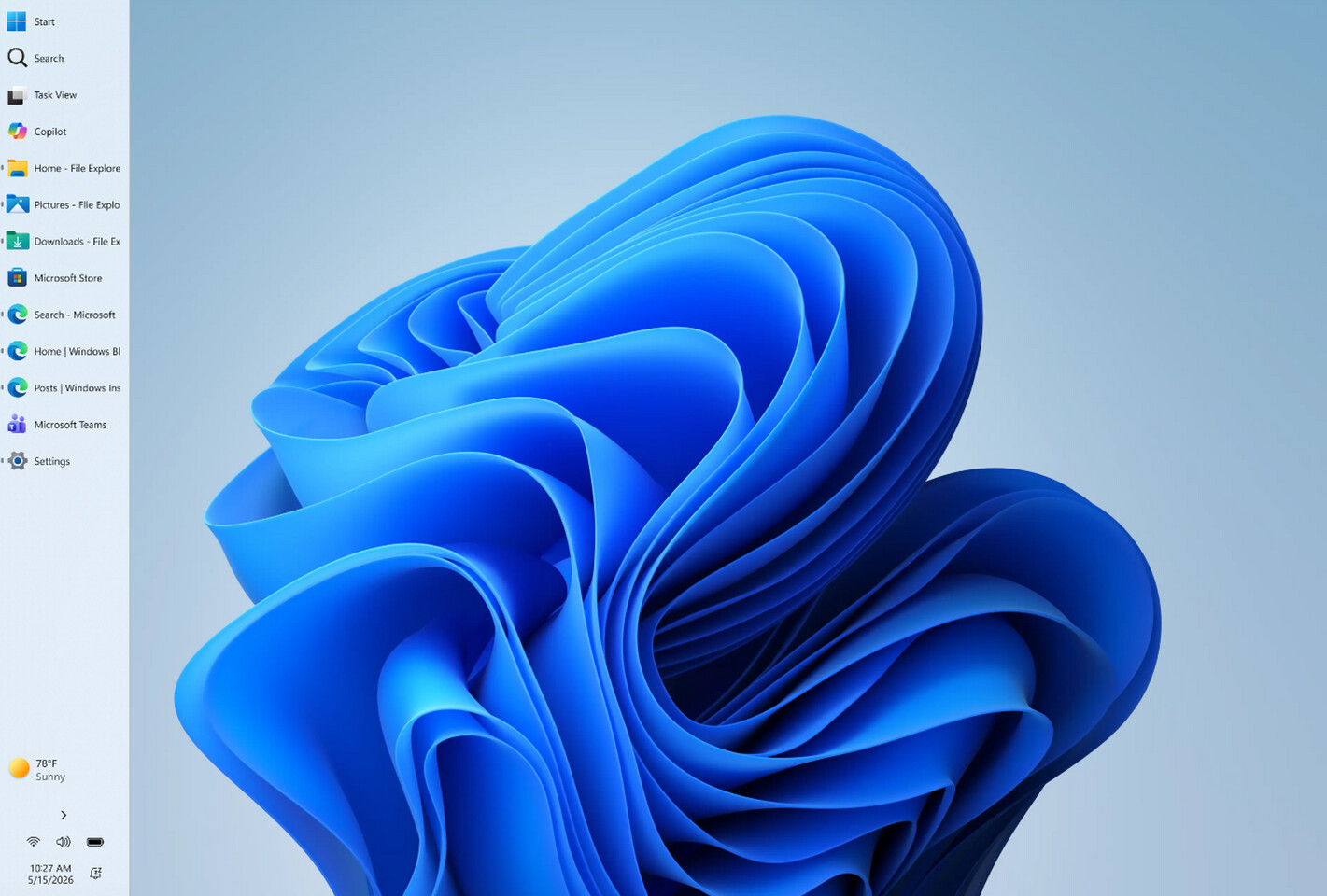
Monday, May 18th 2026 Microsoft Brings Back Windows 10-Style Taskbar and Start Menu Customization in Windows 11 by AleksandarK Today, 00:53 Discuss (0 ) If you were a user of the Windows 10 operating system with a customizable Taskbar location, you were familiar with Taskbar customization and different placements. However, Microsoft kept this feature restricted in Windows 11 for a long time. The company is now introducing full support for Taskbar and Start Menu customization, which will be available to Windows Insiders in the Experimental channel over the coming weeks. Specifically, the Taskbar will be movable to the top, bottom, left, or right side of the screen. From there, users will be able to customize icon alignment for each Taskbar position, whether top-aligned, center-aligned, left-aligned, or right-aligned. All it takes is a visit to Settings > Personalization > Taskbar > Taskbar behaviors, where all of the settings will be located. Interestingly, the Taskbar will also offer smaller icons and a reduced presence, which is a nice addition for anyone looking to maximize usable space. Additionally, Windows Insiders are testing a preview of the revamped Start Menu customization effort, which gives users more meaningful control over Start Menu behavior. One of the changes includes an option to choose between smaller and larger Start sizes, independently hide or show sections like Pinned, Recent, and All, and even remove their name and profile photo for extra privacy during screen sharing or presentations. Previously, these customizations weren't possible, as Windows 11 shipped with a generic Start Menu look for every build. Just as important, Microsoft is separating Start's file recommendations from File Explorer's recent items and jump lists, so disabling recommendations in Start will no longer affect recent activity elsewhere in Windows. At the same time, the company is trying to make the recommendation area more useful by renaming it to Recent, keeping newly installed apps visible, and refining which files appear in that section. These changes are rolling out in the coming weeks for Windows Insiders, meaning that regular Windows 11 users on versions 24H2, 25H2, and 26H1 will experience them in about a month or so. By the time these updates arrive, we hope to see some of the promised Windows K2 performance and usability improvements as well. This means that the Windows 11 OS will finally integrate these much-desired changes. Related News Tags: Custom File Explorer Microsoft Start Menu Task Bar Windows Windows 10 Windows 11 Windows Insiders Aug 18th 2025 Microsoft Windows 11 24H2 Update May Cause SSD Failures (278) Oct 21st 2025 Windows 11 25H2 October Update Bug Renders Recovery Environment Unusable (170) Oct 17th 2025 Microsoft Breaks Localhost with Windows 11 October Update, Users Forced to Revert (105) Sep 30th 2025 Microsoft Releases Windows 11 25H2... With Zero New Features? (114) Dec 14th 2025 Microsoft Copilot AI Comes to LG TVs, and Can't Be Deleted (144) Oct 7th 2025 Microsoft Blocks Online Account Bypass on Windows 11 (162) Aug 19th 2025 Phison Responds to Windows 11 24H2 Update Crashing SSDs (97) Mar 20th 2026 Microsoft Promises Slew of Windows 11 Changes in Response to "Microslop" Criticisms (208) Dec 23rd 2025 Windows 11 25H2 Includes a Faster NVMe Driver Needing Manual Installation (115) May 1st 2026 Microsoft Now Recommends 32 GB RAM as a "No Worries" Upgrade for Windows 11 (145) Add your own on Microsoft Brings Back Windows 10-Style Taskbar and Start Menu Customization in Windows 11 There are no yet.