Opening a game on a high-end PC should feel like flipping a switch: more cores, faster RAM, a beefy GPU—everything just works. Yet many gamers report that even with top-tier hardware, their frame rates stutter, textures glitch, or the game simply refuses to run above a certain threshold, no matter how much they tweak settings.
This disconnect isn’t accidental. It’s rooted in how modern games manage memory, stream assets, and schedule GPU workloads—areas that often fly under the radar of average users but have a massive impact on real-world performance.
The missing layer: why FPS doesn’t tell the whole story
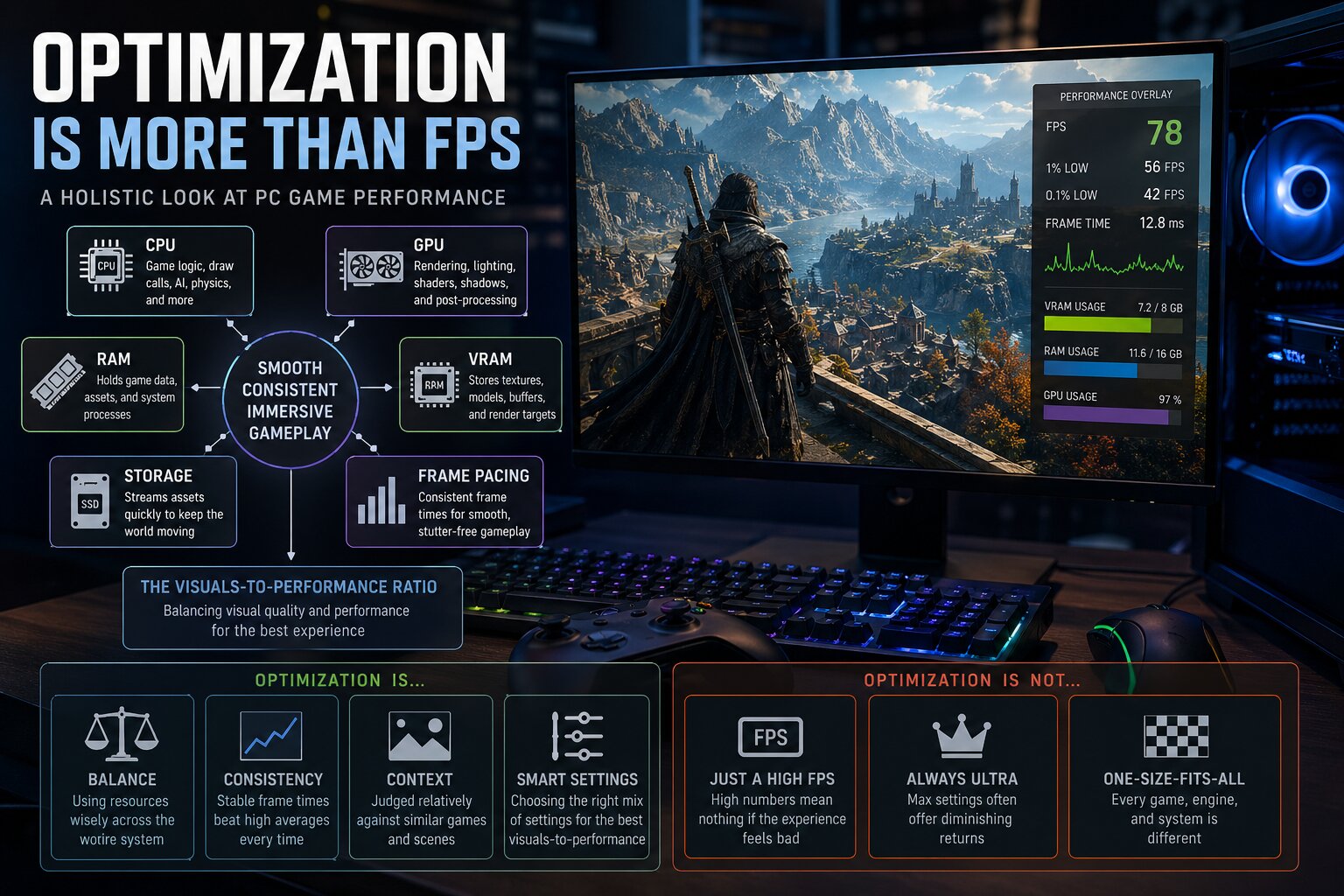
When you see 144 FPS on your screen, it’s not just the result of raw compute. It’s also the product of how efficiently the game can pull data from RAM, decode textures, and avoid stalls in the GPU pipeline. If any of those steps falter—whether due to poor memory bandwidth utilization, inefficient asset streaming, or suboptimal GPU scheduling—the frame counter keeps climbing, but the experience feels broken.
This is especially true on platforms like Windows, where games leverage DirectStorage for faster asset loading and NVMe SSDs for lower-latency data access. But if a game isn’t optimized to take full advantage of these features—or if the underlying hardware can’t keep up with the demands—players end up in a limbo: their system meets or exceeds paper specs, but the game still chokes.
What actually breaks performance—and how to spot it
- Memory bandwidth saturation: Modern games chew through RAM aggressively. A 16 GB kit with DDR5-6000 may sound more than enough, but if a game streams assets in large, unoptimized chunks, the GPU can starve for data.
- Poor asset streaming logic: DirectStorage is only useful if games break their asset pipelines into small, manageable pieces. Many titles still load entire levels or textures at once, causing stalls that no amount of CPU/GPU horsepower can fix.
- Suboptimal GPU scheduling: Some engines don’t prioritize tasks efficiently, leading to pipeline stalls even on high-end GPUs like the RTX 4090. This isn’t always visible in benchmarks because those tests often use synthetic workloads that don’t mirror real-world usage.
These issues aren’t just theoretical. They manifest as micro-stutters, texture pop-ins, or sudden frame drops—problems that can’t be fixed by throwing more hardware at the issue. And without deep visibility into how a game handles these layers, players are left guessing whether their system is underpowered or if the game itself is the bottleneck.
There’s no universal fix yet. Some developers are beginning to expose deeper diagnostics in game settings, but most users still rely on third-party tools that can’t always pinpoint the root cause. Until then, the gap between advertised performance and real-world experience remains a persistent frustration for PC gamers.
Where things stand now: Buyers should treat FPS counters as a starting point, not a definitive measure of system health. A smooth 144 FPS could still hide deeper inefficiencies that no amount of hardware upgrades will resolve without game-side optimizations.