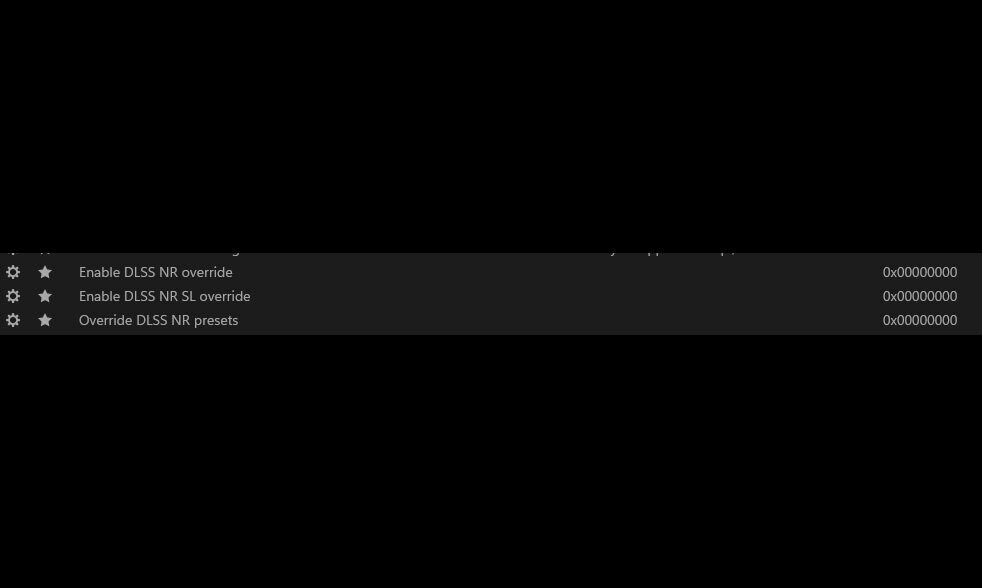
NVIDIA has quietly introduced three new profile settings in its latest GeForce driver that grant users unprecedented control over DLSS Neural Rendering—technology set to debut this fall with the RTX 50 series. These settings, buried within the driver's configuration, suggest a more nuanced approach to AI-assisted rendering than previous iterations of DLSS.
The new options—'Enable DLSS NR Override,' 'Enable DLSS NR SL Override,' and 'Override DLSS NR Presets'—allow users to tweak how neural rendering behaves in supported games. This level of granularity is notable, as it implies NVIDIA is treating Neural Rendering not just as a performance booster but as a feature that can be fine-tuned for specific workloads or visual preferences.
Why This Matters for Power Users
The RTX 50 series, codenamed Blackwell, brings hardware-accelerated neural rendering to consumer GPUs for the first time. While DLSS has long been a staple for upscaling and frame generation, Neural Rendering takes this further by using AI to reconstruct scenes in real-time—a feature that could significantly improve image quality in supported titles.
For power users, these new settings represent a shift from one-size-fits-all presets to customizable behavior. This is particularly relevant for workloads where traditional upscaling isn't enough, such as high-refresh-rate gaming or content creation tasks where fidelity matters more than raw performance. The ability to override presets could mean smoother transitions between scenes or more consistent rendering quality in demanding environments.
Key Specs and Advanced Details
- New DLSS Neural Rendering Settings:
- Enable DLSS NR Override: Allows manual adjustment of neural rendering parameters beyond default presets.
- Enable DLSS NR SL Override: Provides finer control over streamlined neural rendering, likely for optimized performance scenarios.
- Override DLSS NR Presets: Lets users bypass pre-configured settings for tailored rendering behavior.
These controls are exclusive to the RTX 50 series (RTX 5070, RTX 5060, and RTX 5090), which feature dedicated hardware for neural rendering. The Blackwell architecture is designed to handle these tasks more efficiently than previous generations, but without fine-grained user controls, the full potential of Neural Rendering might remain untapped for some use cases.
One limitation worth noting: these settings are currently hidden and require access via third-party tools like Profile Inspector. NVIDIA has also retired its legacy Win32 Control Panel, meaning future driver updates may further streamline or consolidate these options into a more integrated interface. Whether this will happen before the fall launch of DLSS 5 remains unclear.
The introduction of these settings aligns with NVIDIA's broader strategy to push AI rendering deeper into its ecosystem. With titles like AION 2, Assassin's Creed Shadows, and Hogwarts Legacy already preparing for Neural Rendering support, users with RTX 50 series cards will have the tools to experiment with this technology long before it becomes mainstream.
For now, the focus is on understanding how these controls interact with existing DLSS features. Early adopters may find that overriding presets can improve performance in specific scenarios, but broader real-world testing will be needed to determine the best use cases. One thing is certain: NVIDIA is laying the groundwork for a more customizable rendering experience, and the RTX 50 series is at the forefront of this shift.