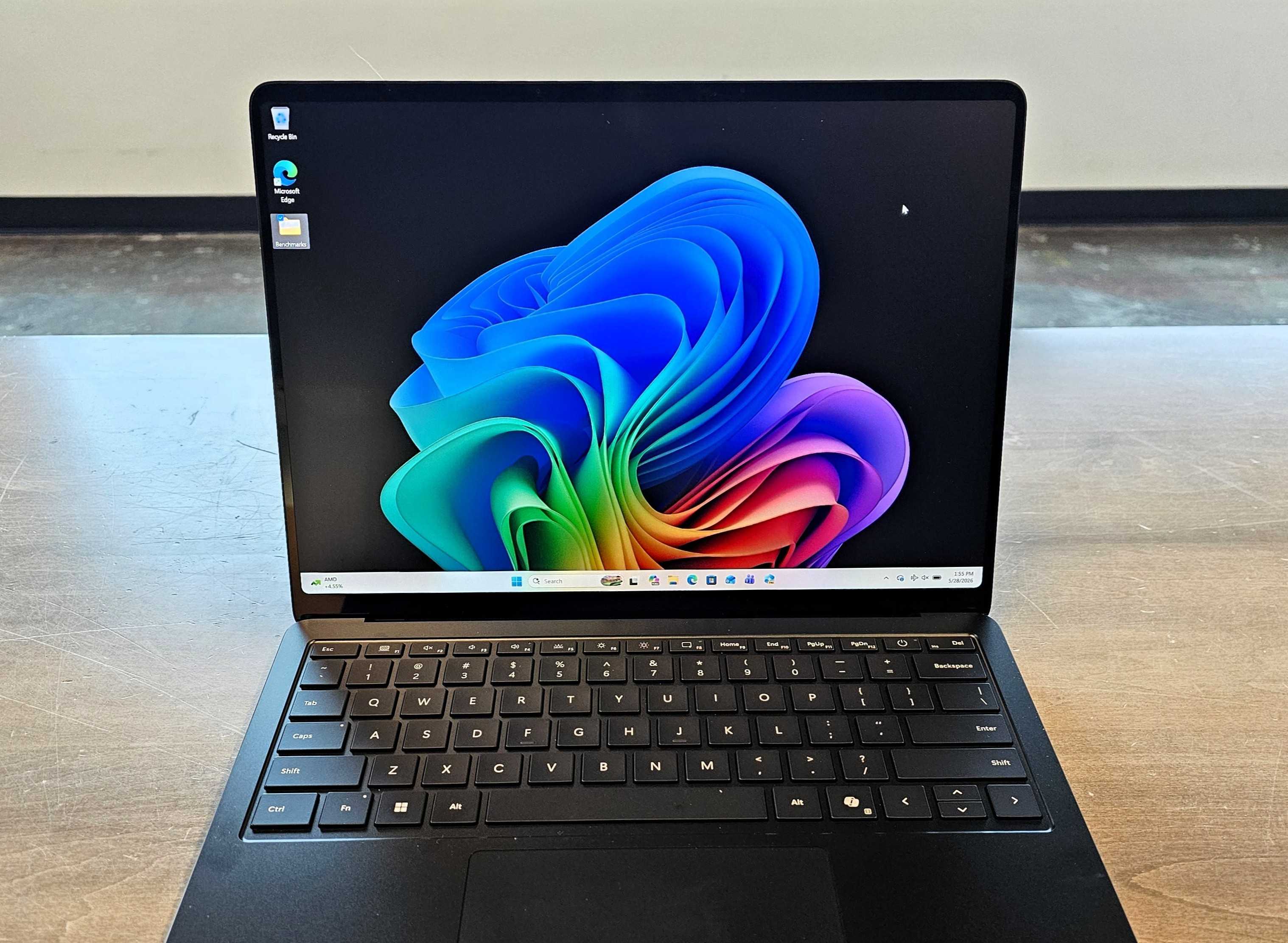
Reviews Surface Laptop 8 for Business review: Yesterday’s laptop at tomorrow’s price Shave $1,000 off the price, and it might be justifiable. As it is, there are simply too many cheaper alternatives. , PDT Intel Core Ultra Series 300 (Panther Lake) chip inside. However, it’s extraordinarily overpriced, and the new additions don’t come close to justifying the higher price tag. Price When Reviewed This value will show the geolocated pricing text for product undefined Best Pricing Today Price When Reviewed$3,299 Best Prices Today: Microsoft Surface Laptop 8 for Business Retailer Price $3299 View Deal Product Price For the first time in decades, I wasn’t excited to review a Surface device. Now that I’m finished, I’m still not. The Surface Laptop 8th Edition (or Surface Laptop 8) for Business has two things going for it: an upgrade to Intel’s excellent Core Ultra 300 series processors (Panther Lake) and a moderately useful privacy screen, which can dim and obfuscate the display at the touch of a button. Unfortunately, Microsoft has left the traditional Surface premium in place, a price ladder that pushes the laptop’s cost to unattractive heights. To be fair, this is a business-class laptop. A consumer version of this Surface Laptop will follow later this year, with a Qualcomm Snapdragon X2 Elite Extreme chip inside it. Based upon my own testing of both chips, it’s probably fair to say that Intel’s Core Ultra 300 processor will outperform it by a slight amount, at least in graphics and maybe battery life. Some Surface fans may say that Microsoft has reached the heights of the design and can go no further. Others may criticize it as stale. I fall into the latter category. I now use sticky notes attached to the underside of the Surface Laptops I review. Why? They’re all virtually indistinguishable from one another. Mark Hachman / Foundry Microsoft Surface Laptop 8: Configuration Microsoft’s Surface Laptop 8 is available with display sizes of both 13.8 inches and 15 inches, formally known as the Surface Laptop for Business (8th Edition) or the Surface Laptop 8 for Business. You can also purchase the laptop with a 13-inch display. Microsoft has never offered the Surface Laptop with such a screen size before, meaning that it is simply known as the Surface Laptop for Business, 13-inch. Buying the smaller Surface Laptop saves you several hundred dollars (prices start at $1,499.99, versus $1,949.99 for the 13.8-inch Surface Laptop) and limits your component options to just a Core Ultra 5 325 processor, up to 24GB of RAM, and up to a terabyte of SSD storage. On paper and in the hand, the Surface Laptop 8 for Business is essentially identical to 2024’s Surface Laptop 7, which weighed 0.01 pounds less and was priced at $999 on up to $1,999.99. Sure, that was a consumer version of the Surface Laptop, using a Snapdragon X1 Elite… but the fact remains: the minimum price essentially doubled from two years ago. That’s a tough sell in any market. At press time, the Surface Laptop 8 for Business is only available from Microsoft itself and at no other retailer. The configuration below reflects the 13.8-inch version. Processor: Core Ultra 5 335, Core Ultra 7 366H, Core Ultra X7 368H (368H as tested) Display: 13.8-inch (2304 x 1536) PixelSense Flow, 24-120Hz, Dolby Vision, anti-reflective ISO-9241 or anti-glare with integrated privacy screen (privacy screen as tested) Memory: 16GB/32GB/64GB LPDDR5X, 16GB as tested Storage: 256GB/512GB/1TB PCIe Gen 4 M.2 NVMe SSD, 512TB as tested Graphics: Iris Arc B390 NPU: 50 TOPS Ports: 2 USB-C/Thunderbolt 4, USB-A, 3.5mm headphone hack, Surface Connect port Security: Windows Hello camera Camera: 1080p (user-facing, Windows Hello) Battery: Design capacity: 52.3Wh, Full capacity (as tested): 54.1Wh Wireless: Wi-Fi 7, Bluetooth Core 5.4 Audio: Dual Studio Mics, Omnisonic speakers with Dolby Atmos Operating system: Windows 11 Pro Dimensions: 11.85 x 8.67 x 0.69in. Weight: 2.97 lb Colors: Platinum and Matte Black Prices: $1,949.99 to $3,699.99 ($3,299 as tested) Surface Laptop 8: Something old, something new The aesthetics of the Surface Laptop haven’t changed in years. Out of the box, the Laptop fits comfortably in the hand, while the glossy aluminum chassis now boasts up to 64 percent recycled content. It does attract fingerprints, so keep a microfiber cloth around to polish them away. I don’t find 2.97 pounds to be uncomfortable, either in the hand or in my backpack, so you should have no concerns there. A few things differentiate the Surface Laptop 8 from its predecessors. First, there’s the processor, a spec bump to the Intel Core Ultra Series 3 chip, known as Panther Lake. The available configurations include both the “base” Core Ultra 5 and 7 configurations along with the Core Ultra X7 368, which includes Intel’s powerful integrated GPU. Don’t be too excited by that, as the limited cooling within the Laptop thermally throttled the GPU considerably over prolonged periods. Second, there’s an odd omission. The Surface app, which is used to monitor the Laptop’s battery charging options and a few other tweaks. I had to download it from the Microsoft Store. Finally, Microsoft added a “privacy screen” technology, exclusive to the 13.8-inch version. Essentially, the Surface Laptop’s “privacy screen” technology, discussed more here, functions about the same as the the Privacy Display feature on Samsung’s new Galaxy S26 phone. It’s triggered by a brand-new key on the keyboard, mounted as the F1 key next to the Esc key on the top row. Press it and the display both darkens and configures itself to make it harder to read from the sides. (Microsoft explains how the privacy screen works, here, without explaining how it actually works.) Mark Hachman / Foundry The privacy technology uses the laptop’s ability to adjust its own display brightness both as a reaction to the user’s preferences as well as the ambient light. The dimmer the display, the harder it is for someone next to you to make out what’s on it. But a dimmer display is also harder to read, period. In my tests, it was a mixed bag. In a dim room, from a few feet away, the display dimmed to almost opaque from about 15 degrees off the axis of the display. In a brighter room, more of the display’s content became visible. I could always make out the type of content on the screen, if I wasn’t able to read the entirety of it. Still, at least part of the screen was left relatively unobscured, unless I was seated far away. It’s hard to characterize how effective the privacy screen is, simply because its effectiveness varied within the same set of conditions in the same room. Consider the following comparisons. In the first, the perspective changes slightly. The Surface Laptop 8 for Business, with the privacy screen both off and on. From that perspective, the privacy screen seems barely effective. For this, I tried to imagine what it would be like from the perspective of someone sitting in an aisle seat on an airplane, casually glancing toward someone working in the seat near the aisle. In this angle, I don’t really think Microsoft’s privacy shield works. But, shot from another angle, it’s not too bad. It would have been helpful if Microsoft would have been able to tell us under what scenarios the privacy shield would be most effective. In a darkened airplane, with an overhead light on for illumination? In a fairly bright room such as this? In a dimmer room, the shield seemed more effective… but should you be forced to adjust your working conditions to compensate? It does seem like the privacy screen’s efficacy is subject to the available ligh...