When you look at today’s webcam market, the most striking trend is how quickly 4K became the baseline expectation—even for cameras priced under $50. But higher resolution alone doesn’t guarantee a better experience. The difference now lies in what else each model brings to the table: adjustable focus, stable mounts, or software that actually makes a difference.
For most users, a 4K webcam is still the smartest upgrade from a laptop’s built-in 720p sensor. Larger sensors mean better low-light performance and more natural-looking video, even if the software you use—Zoom, Teams, or Meet—can’t display it at full resolution. Yet some of the cheapest 4K options cut corners in ways that matter: fixed focus, flimsy mounts, or clunky software that feels like an afterthought.
Who Should Upgrade—and Who Doesn’t Need To
The need for a dedicated webcam depends on your use case. If you’re mostly in well-lit rooms and happy with 1080p, a basic model like the Logitech Performance FHD (priced around $45) is still a solid pick. But if you stream, teach, or work in variable lighting, a 2K or 4K upgrade—even at budget prices—will make a visible difference in clarity and smoothness.
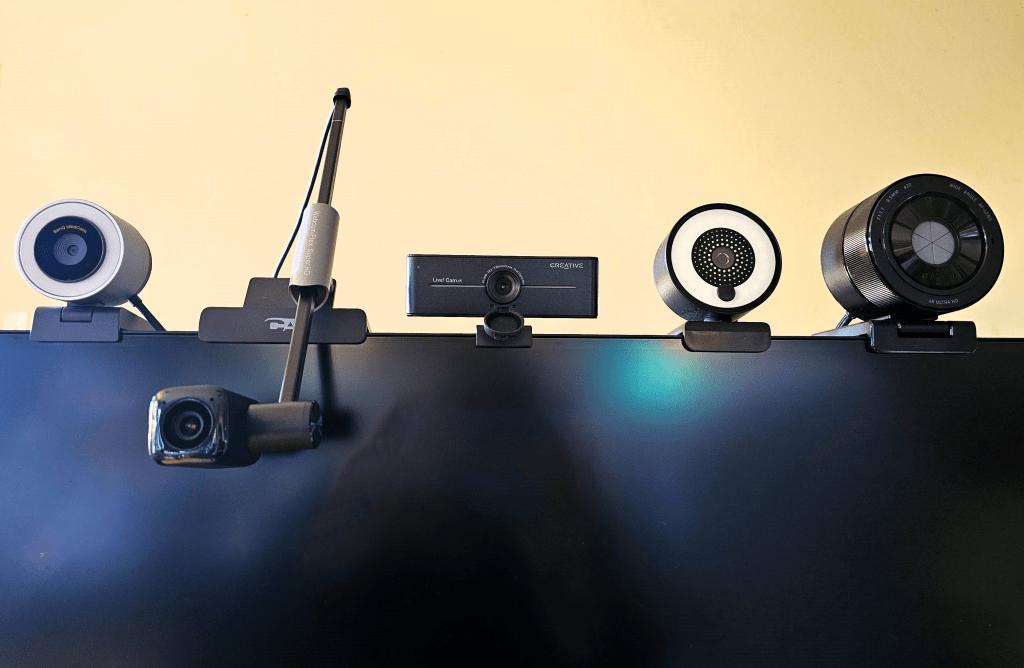
- Best overall value: eMeet Piko+ – A dual-lens design that delivers crisp 4K even in low light, now with a standard laptop mount. Current price: $79.99
- Best budget 4K: Creative Live! Cam Sync 4K – Manual focus isn’t ideal for movement, but at $50 it’s hard to argue with the resolution and basic software controls.
- Best for groups: NexiGo N980P – A 120-degree field of view captures multiple people smoothly at 60fps, though fixed focus limits flexibility. Price: $54.99
For professionals or streamers who move around, the OBSBOT Tiny 2 PTZ 4K ($299) stands out with its pan-tilt-zoom gimbal and 60fps tracking. It’s overkill for static setups, but its AI face-tracking turns it into a versatile tool for presentations or lectures.
What to Watch For When Buying
- Resolution: 4K is now common, but check if the camera supports 60Hz—smoother than standard 30fps.
- Field of view (FOV): A narrower FOV (e.g., 65 degrees) isolates you; wider angles (120+ degrees) suit groups but may introduce distortion.
- Mounting: Laptop clips or adjustable stands are essential for flexibility. Some models, like the eMeet Piko+, now include both.
The Anker PowerConf C200 ($47.99) is a middle-ground pick: it skips 60fps but offers autofocus and a tight field of view that makes it ideal for one-on-one calls or streaming. Its software, while necessary, isn’t as polished as competitors’, which is a minor trade-off for the price.
Premium vs. Practical
The BenQ IdeaCam S1 Pro ($199) blurs the line between pro and hobbyist with its macro lens and remote control, but it’s not 4K—just close enough to matter in most settings. It’s built for detail work (think woodworking or baking streams) rather than raw resolution.
At the top end, the OBSBOT Tiny 2 PTZ 4K is the only model that truly justifies its $300 price with active tracking and HDR imaging. For everyone else, the sweet spot is now between $50 and $80: models that deliver 4K without sacrificing build quality or essential features.
Final Thought
The days of choosing a webcam based solely on resolution are fading. Today’s best buys focus on low-light performance, stable mounts, and software that actually enhances the experience—not just adds bloat. If you’re upgrading, prioritize autofocus (for movement) and a mount that works with your setup. The rest is window dressing.